Seedance 2.5 Draft Mode: Preview in 480p, Then Render the Final in 1080p
Draft mode, added to Seedance 2.5 by BytePlus in September 2026, splits a generation into two steps. You render a 480p draft first, billed like any 480p clip. If the shot works, you render the final from that draft: 1080p, billed like any 1080p clip, and generated from the draft's prompt, references, duration, aspect ratio and seed, so it stays consistent with the take you approved instead of being a new roll of the dice. A draft can be turned into a final for 7 days. Among the Seedance 2.x models, only 2.5 supports it.
What is Seedance 2.5 draft mode?
Seedance 2.5 draft mode is a two-step way to generate a video. You first render a cheap 480p draft to check the scene, the camera, the motion and whether the model understood your prompt. If the draft works, you render a 1080p final from its task ID, reusing the same prompt, references and seed, so you only pay for 1080p once.
Most of the money in AI video goes into takes you throw away. A shot rarely works on the first try: the camera drifts, a character turns the wrong way, the product warps. Without draft mode every one of those failed tries is billed at the resolution you want to deliver in. Draft mode moves the trying to 480p and pays for 1080p once, for the take you keep.
BytePlus positions the draft as a check on four things: scene structure, shot scheduling (the camera), subject motion, and whether the model understood the prompt. Those are exactly the things that decide whether a take is usable, and none of them needs 1080p to judge.
How it works: two steps
- Step 1, the draft. Create the task with draft mode on. The draft renders at 480p only and is billed exactly like a normal 480p video.
- Step 2, the final. When the draft has finished and you like it, create the final from the draft. It renders at 1080p only and is billed like a normal 1080p video. Do this within 7 days of creating the draft.
| Parameters | Rule | |
|---|---|---|
| Fixed | Model, resolution | Same model as the draft; the final is always 1080p. |
| Reused automatically | Prompt, reference images, videos and audio, duration, aspect ratio, seed, audio on/off, task type | Taken from the draft. Sending them again is an error, even with identical values. |
| Can be set again | Output format, watermark, return last frame, callback URL | Not inherited: if omitted, the model default applies. AiuniVid sends the draft's own values for you. |
Native 1080p, not an upscale
The final is not the draft file enlarged. Seedance 2.5 generates it again at 1080p, with 10-bit colour and H.265/HEVC encoding, from the draft's prompt, references and seed. That is why it can show detail the 480p draft never had, and also why small details can differ from the draft.
| Route | Where the 1080p frames come from | Credits on AiuniVid | Matches the 480p preview? |
|---|---|---|---|
| Draft, then final | Seedance 2.5 renders them at 1080p from the draft's inputs and seed | 83 + 328 | Consistent, not frame-identical |
| 480p clip plus an upscaler | An upscaler enlarges the 480p frames | 83 plus the upscaler | Yes, the same frames enlarged |
| 1080p directly | Seedance 2.5 renders them at 1080p | 328 per try | No preview; each try is a new take |
An upscaler keeps exactly what you saw, but everything it adds is inferred from 480p frames. The draft route costs more than a 480p clip plus an upscaler, and in return the model itself draws the 1080p frames. 720p is a middle ground for a single try, but a draft cannot be finalized at 720p.
What actually changed: one shot, three renders
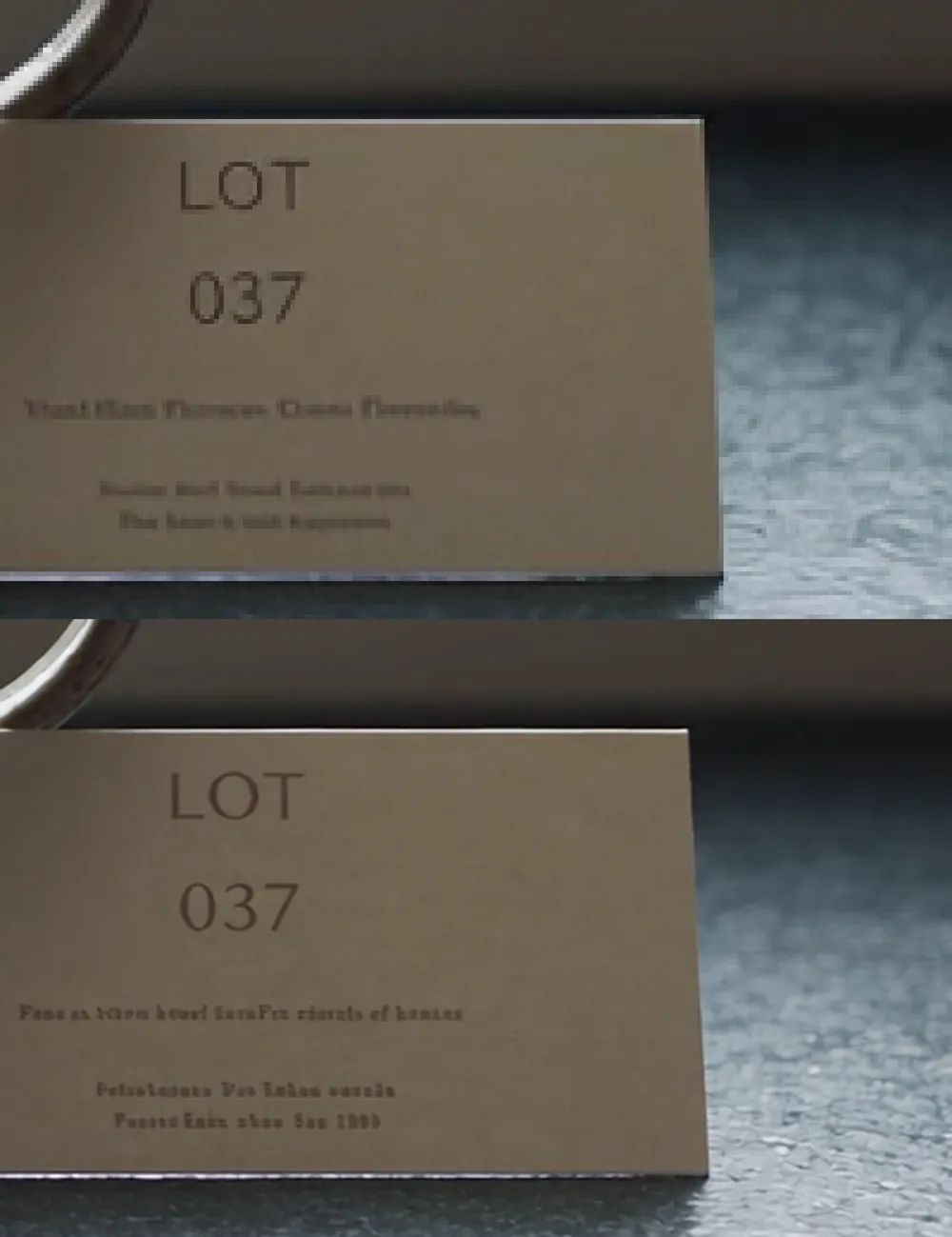
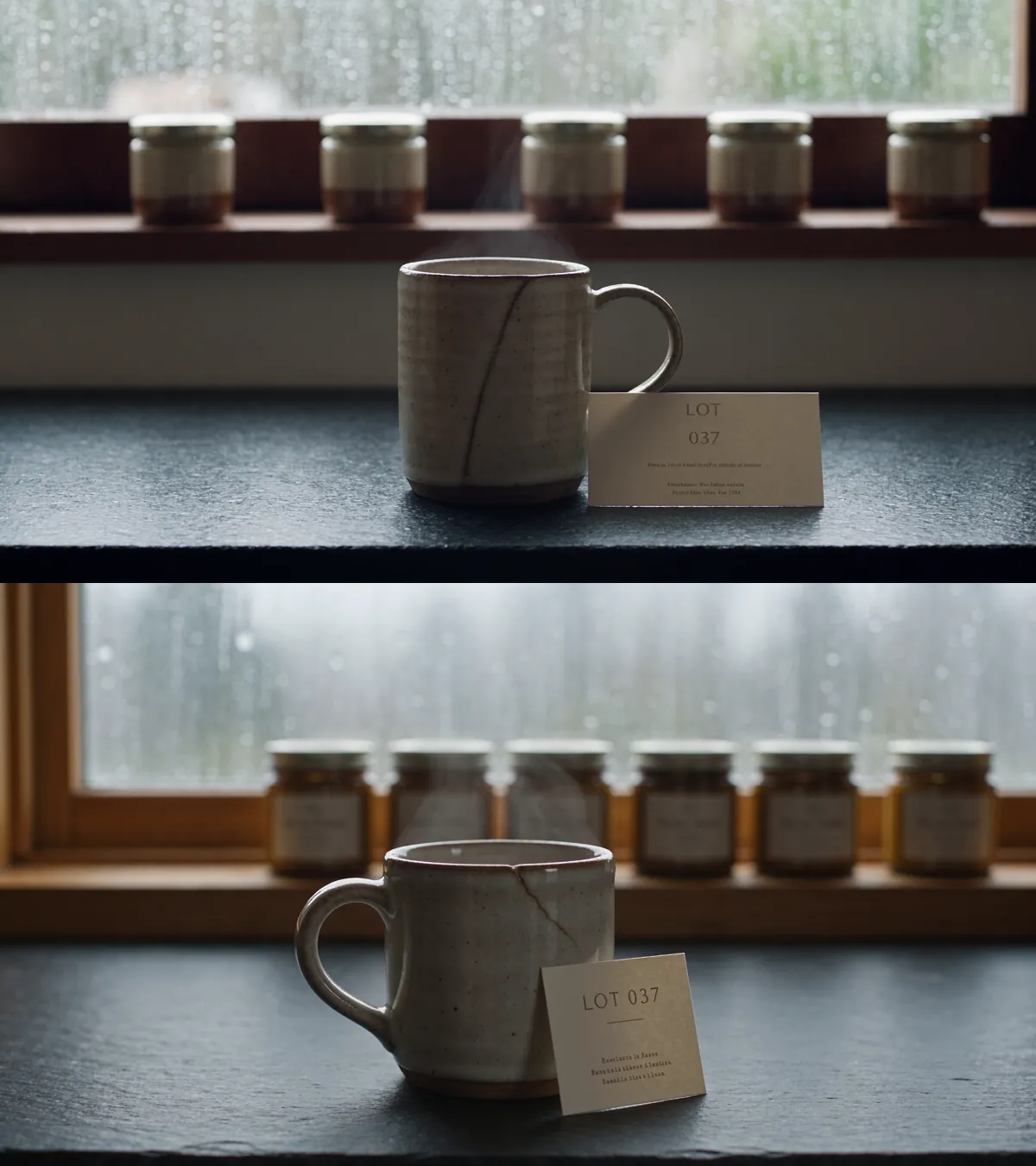
Everything above is what BytePlus documents. This is what we measured. On 5 seconds of Seedance 2.5 we ran the same prompt three ways: straight to 1080p, as a 480p draft, and as the 1080p final rendered from that draft. Same wording every time, locked camera, sound on.
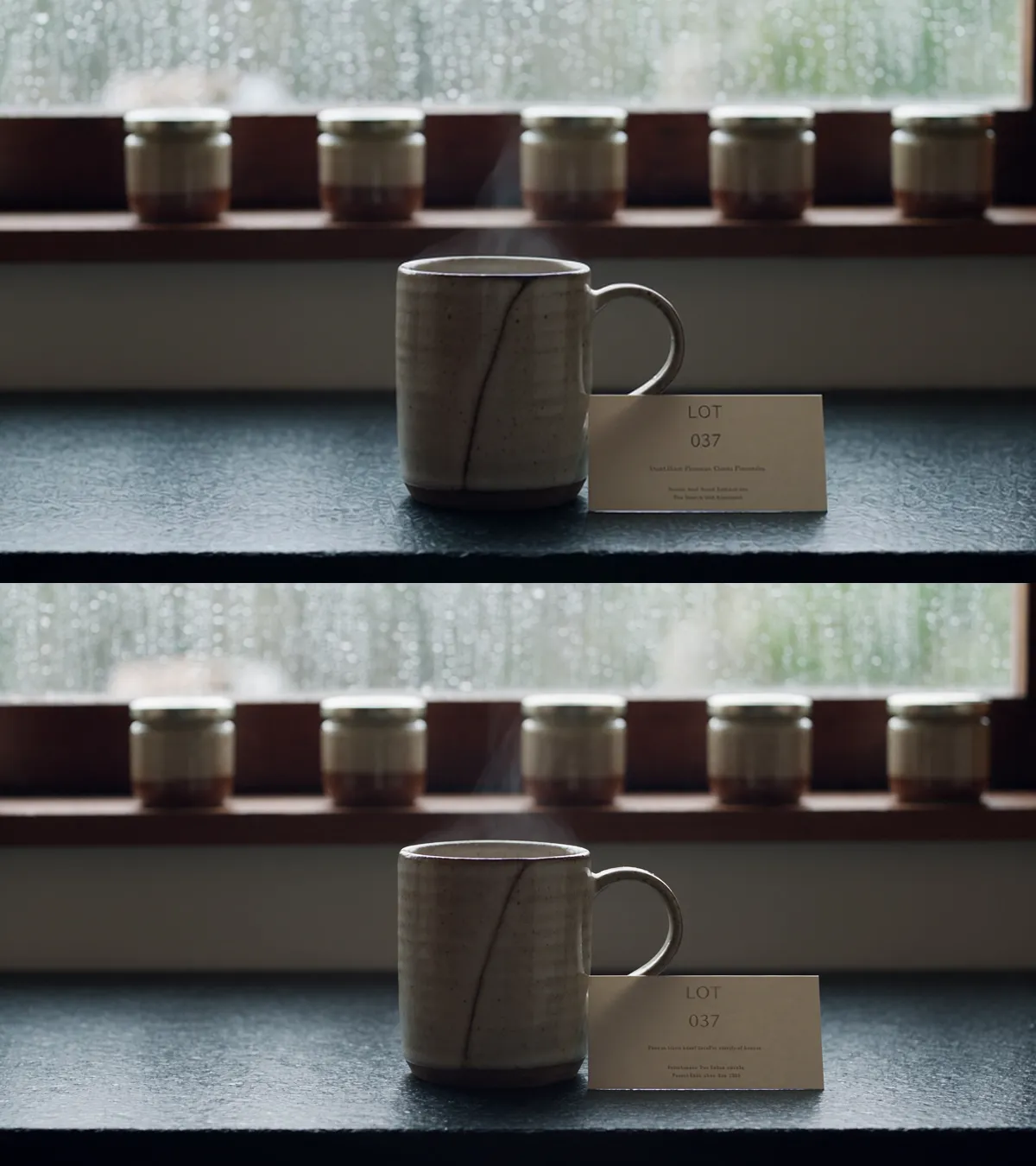
Now the same card at 1:1, with the draft blown up to the final's size so the two are comparable. This is the part that settles the upscale question.
Against a fresh 1080p generation of the same prompt, the picture is different: similarity drops to 0.62, and you can see why. The handle swaps sides, a wooden window frame appears, the jars gain labels, the whole frame warms up. That is a different take, not a sharper one.
One more number from the same run, offered as an observation rather than a benchmark: the direct 1080p render took 164 seconds, while the draft plus its final took 59 and 39. One run on shared infrastructure proves nothing about speed in general, but it does mean a draft comes back sooner than a 1080p attempt, which is the point of looking at one.
When draft mode saves credits, and when it does not
There is no separate draft price: a draft is billed as a 480p clip and a final as a 1080p clip. These are the credits AiuniVid charges on Seedance 2.5, computed with the same formula that bills your account, with sound on; reference images do not change the price. One credit is $0.01 in every credit pack.
| Length | 480p draft | 1080p final (now) | 1080p final (list) | Draft + final |
|---|---|---|---|---|
| 5 s | 83 (≈ $0.83) | 328 (≈ $3.28) | 455 (≈ $4.55) | 411 (≈ $4.11) |
| 10 s | 165 (≈ $1.65) | 656 (≈ $6.56) | 910 (≈ $9.10) | 821 (≈ $8.21) |
| 15 s | 247 (≈ $2.47) | 983 (≈ $9.83) | 1365 (≈ $13.65) | 1230 (≈ $12.30) |
| 30 s | 494 (≈ $4.94) | 1966 (≈ $19.66) | 2730 (≈ $27.30) | 2460 (≈ $24.60) |
The 1080p price is discounted until Oct 17, 2026 at 00:00 (UTC+8). A final is charged at the price in effect when you create it, not when you created the draft.
A draft costs about 25% of its final. If the very first draft is the one you keep, draft plus final costs more than going straight to 1080p (411 against 328 credits for 5 seconds). The saving starts as soon as a shot needs 2 attempts. At three attempts, going straight to 1080p costs 984 credits; three drafts and one final cost 577, 41% less. The longer the clip, the bigger the stake: a 30-second final is 1966 credits, its draft 494.
Draft workflows: short dramas, product videos, previs
- Short dramas and story clips. Blocking, expressions and dialogue timing take several tries. Iterate at 480p and pay for 1080p only for the take that plays.
- Product videos and client sign-off. Check that the product keeps its shape, colour and logo, and send the 480p draft to the client. The final is rendered from the draft they approved, not from a fresh generation that might look different.
- Long takes and previs. Seedance 2.5 generates up to 30 seconds in one go, which makes each failed long take expensive. Storyboard-to-video and game or film previs shots are the clearest case for a draft.
- Multi-character and motion-reference shots. When you hold several characters or copy motion from a reference video, a draft shows early whether faces and movement held. See keeping a character consistent across shots.
- Batches through the API. Render every shot of a series as a draft, review them, and finalize only the ones you keep.
Limits, and when to skip draft mode
- You deliver in 720p. The final is always 1080p. Generating at 720p directly is cheaper.
- The shot usually works first time. Simple shots rarely need a second try, and then draft plus final is the more expensive route.
- You will decide after 7 days. An expired draft can no longer be turned into a final.
- You are on Seedance 2.0. Among the 2.x models draft mode is a Seedance 2.5 feature; see Seedance 2.5 vs 2.0 for the other differences.
- You need the file to play in every browser. Seedance 2.5 1080p is H.265/HEVC with 10-bit colour, and some browsers only play it after download.
Moderation works the same on drafts: a draft that trips content review is refused like any other clip, and failed generations return their credits either way.
Draft mode vs testing on a cheaper model
Another common approach is to test a prompt on a cheaper model and run the winner on Seedance 2.5. A 5-second 480p test costs 12 credits on Seedance 2.0 Mini and 28 on 2.0 Fast, against 83 for a Seedance 2.5 draft. The difference is what carries over. A test on another model checks the prompt: the 2.5 render afterwards is a new generation by a different model, so composition, motion and timing start over. A 2.5 draft checks the shot itself, because the final reuses its inputs and seed. Explore ideas on a cheaper model; switch to draft mode once you are choosing between takes.
Seedance 1.5 pro draft vs Seedance 2.5 draft
BytePlus also offers draft mode on the older Seedance 1.5 pro, which is why some guides and search suggestions mention it. The two work differently:
| Seedance 1.5 pro | Seedance 2.5 | |
|---|---|---|
| Draft resolution | 480p | 480p |
| Draft price | With audio, 60% of a normal clip's tokens at the same rate | Same as a normal 480p clip |
| Final resolution | Chosen when you render the final | 1080p only |
| Carried from draft to final | Prompt, images, audio on/off, seed, aspect ratio, duration, fixed camera | Prompt, reference images, videos and audio, audio on/off, seed, aspect ratio, duration, task type |
| Draft valid for | 7 days | 7 days |
| On AiuniVid | Not offered | Workspace and API |
How to use Seedance draft mode on AiuniVid
- Open the workspace and pick Seedance 2.5. Switch on Draft; the resolution locks to 480p and the quote updates. For long shots, several references or a 1080p setting, the workspace suggests it for you.
- When the draft finishes, its card shows Render 1080P final with the credit cost. One click starts the final; it appears in your creations as a new card marked Final 1080P.
- One draft makes one final on AiuniVid, so a double click can never charge twice. If the final fails, its credits come back and you can render it again.
Seedance draft mode via the API
Pass draft: true when you create the task, then call the final endpoint with the draft's task ID once it has succeeded. The final takes no body beyond an optional callback_url and metadata, because everything else comes from the draft. Full reference in the API docs.
curl --request POST \
  --url https://aiunivid.com/api/open/v1/videos/generations \
  --header "Authorization: Bearer $AIUNIVID_API_KEY" \
  --header "Idempotency-Key: $(uuidgen)" \
  --header "Content-Type: application/json" \
  --data '{
    "model": "seedance-2.5-text-to-video",
    "prompt": "A courier hands a parcel to a surprised neighbour in a narrow hallway, handheld camera",
    "duration": 10,
    "aspect_ratio": "9:16",
    "draft": true
}'curl --request POST \
--url https://aiunivid.com/api/open/v1/videos/generations/$DRAFT_TASK_ID/final \
--header "Authorization: Bearer $AIUNIVID_API_KEY" \
--header "Idempotency-Key: $(uuidgen)"The same flow in Python and Node.js, polling until each task finishes. A new Idempotency-Key per request means a retry after a network error never creates a second task.
import os, time, uuid, requests

BASE = "https://aiunivid.com/api/open"
AUTH = {"Authorization": f"Bearer {os.environ['AIUNIVID_API_KEY']}"}

def post(path, body=None):
    headers = {**AUTH, "Idempotency-Key": str(uuid.uuid4())}
    res = requests.post(BASE + path, json=body or {}, headers=headers, timeout=60)
    res.raise_for_status()
    return res.json()

def wait(task_id):
    while True:
        task = requests.get(f"{BASE}/v1/videos/generations/{task_id}", headers=AUTH, timeout=60).json()
        if task["status"] in ("succeeded", "failed", "cancelled"):
            return task
        time.sleep(15)

draft = wait(post("/v1/videos/generations", {
    "model": "seedance-2.5-text-to-video",
    "prompt": "A courier hands a parcel to a surprised neighbour in a narrow hallway, handheld camera",
    "duration": 10,
    "aspect_ratio": "9:16",
    "draft": True,
})["id"])
print("draft", draft["status"], draft["result"] and draft["result"]["download_url"])

# Only if you like the draft:
final = wait(post(f"/v1/videos/generations/{draft['id']}/final")["id"])
print("final", final["status"], final["result"] and final["result"]["download_url"])import { randomUUID } from "node:crypto";
const BASE = "https://aiunivid.com/api/open";
const AUTH = { Authorization: `Bearer ${process.env.AIUNIVID_API_KEY}` };
async function post(path, body = {}) {
const res = await fetch(BASE + path, {
method: "POST",
headers: { ...AUTH, "Content-Type": "application/json", "Idempotency-Key": randomUUID() },
body: JSON.stringify(body),
});
const data = await res.json();
if (!res.ok) throw new Error(`${data.error?.code}: ${data.error?.message}`);
return data;
}
async function wait(id) {
for (;;) {
const task = await (await fetch(`${BASE}/v1/videos/generations/${id}`, { headers: AUTH })).json();
if (["succeeded", "failed", "cancelled"].includes(task.status)) return task;
await new Promise((resolve) => setTimeout(resolve, 15_000));
}
}
const draft = await wait((await post("/v1/videos/generations", {
model: "seedance-2.5-text-to-video",
prompt: "A courier hands a parcel to a surprised neighbour in a narrow hallway, handheld camera",
duration: 10,
aspect_ratio: "9:16",
draft: true,
})).id);
console.log("draft", draft.status, draft.result?.download_url);
// Only if you like the draft:
const final = await wait((await post(`/v1/videos/generations/${draft.id}/final`)).id);
console.log("final", final.status, final.result?.download_url);Draft tasks carry draft: true and draft_expires_at (Unix seconds); finals carry draft_id. Errors to handle:
| HTTP | Code | Meaning | What to do |
|---|---|---|---|
| 409 | draft_not_ready | The draft has not succeeded yet, or it failed | Wait for succeeded; if it failed, make a new draft |
| 410 | draft_expired | More than 7 days since the draft was created | Make a new draft |
| 409 | final_exists | A final for this draft is running or done | Poll details.task_id instead of creating another |
| 400 | invalid_request | The task was not created with draft: true | Only drafts can be finalized |
| 404 | task_not_found | Unknown ID, or a task from another account | Check the ID and the API key |
| 402 | insufficient_credits | Not enough credits for the 1080p final | Top up, then call again with a new key |
| 422 | unsupported_capability | draft on a model other than Seedance 2.5, or a quality other than 480p | Use a seedance-2.5 model and omit quality |
Frequently asked questions
What is Seedance 2.5 draft mode?
A two-step way to generate with Seedance 2.5: render a low-cost 480p draft to check the scene, camera, motion and prompt, then render a 1080p final from the draft's task ID. The final reuses the draft's prompt, references, duration, aspect ratio and seed.
Is the Seedance draft free?
No. BytePlus bills a Seedance 2.5 draft exactly like a normal 480p clip, so on AiuniVid a 5-second draft is 83 credits (about $0.83). What draft mode saves is the cost of rejected takes at 1080p.
Is Seedance draft mode cheaper?
Only when a shot would take 2 or more attempts. A draft is billed as a 480p clip and the final as a 1080p clip, so keeping the very first draft costs more than going straight to 1080p. On AiuniVid a 5-second draft is 83 credits and its 1080p final 328 (455 after the current 1080p discount ends).
How long is a Seedance draft valid?
7 days from when the draft task is created. After that the draft can no longer be turned into a final; generate a new draft instead.
Will the final look exactly like the draft?
It is regenerated at 1080p from the draft's prompt, references and seed, which BytePlus describes as producing a consistent final video. It is not an upscale of the draft file, so fine textures, small text or crowds can differ. Treat the draft as a preview of the shot, not of every frame.
Can I change the prompt or resolution for the final?
No. The final is always 1080p and reuses the draft's prompt, references, duration, aspect ratio, seed and audio setting; sending them again is an error. To change the prompt, make a new draft. If you deliver in 720p, generate at 720p directly.
Can I render more than one final from a draft?
On AiuniVid, one draft makes one final, so a double click can never charge twice. If the final fails, its credits are returned and you can render it again. BytePlus does not document a limit, so other platforms may handle this differently.
Which platforms support Seedance 2.5 draft mode?
Draft mode is part of the BytePlus ModelArk API, so it is available wherever a platform has built it in. AiuniVid supports it in the web workspace and the API. Other platforms may set their own rules, such as a shorter validity window or separate pricing, so check their documentation; the BytePlus rule is 7 days.
Does Seedance 2.0 support draft mode?
No. Among the Seedance 2.x models only 2.5 has draft mode; Seedance 2.0, 2.0 Fast and 2.0 Mini generate at the resolution you choose in a single step. BytePlus also documents a draft mode for the older Seedance 1.5 pro.
Sources
- BytePlus ModelArk · Dreamina Seedance 2.5 tutorial: Draft mode
- BytePlus ModelArk · Create a video generation task (API reference)
- BytePlus ModelArk · Video generation tutorial (Seedance 1.5 pro draft mode)